Printify Mockups for Artists
Beyond Supplier Templates
Visualize with unique room scenes, list on Etsy or Shopify, fulfill with Printify. Buyers should not recognize your hero image from ten other shops.
Visualize → List → Fulfill on Printify
Printify's strength is supplier choice and base-cost flexibility. Its mockup templates are shared infrastructure - useful, not distinctive. Artists who treat Printify mockups as the entire listing surface end up looking like every other POD shop that pulled from the same library. Buyers shopping wall art learn those walls and frames on sight. Fitting room context raises purchase intention for experience goods (Maier & Dost, Journal of Retailing and Consumer Services, 2018) - which is why MOCKLIO room scenes should lead image one while Printify stays on fulfill. Differentiation has to come from presentation you own, not from the fulfillment partner's default crop.
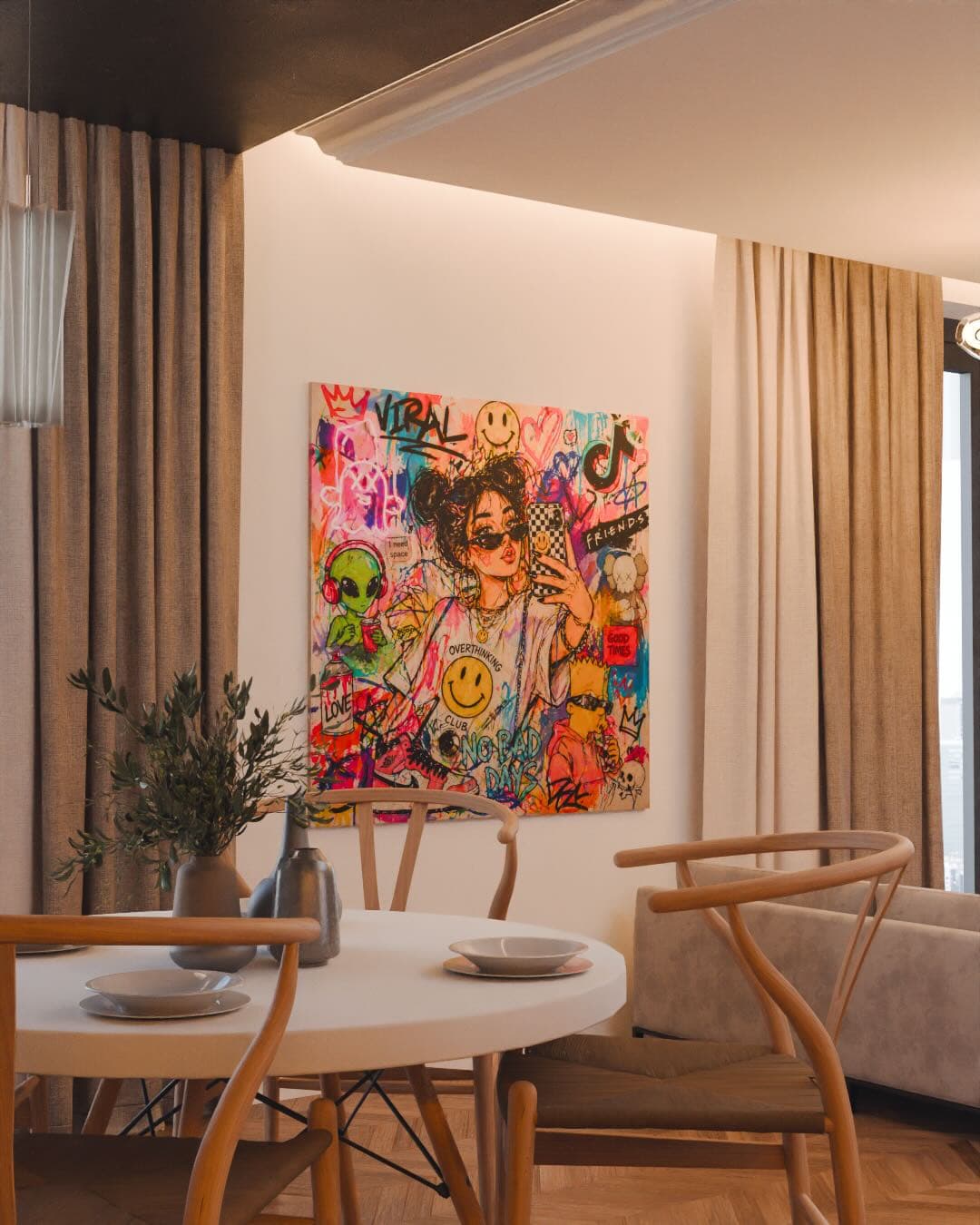
Visualize means photoreal room scenes where your piece is already installed: scale, light, furniture, atmosphere. MOCKLIO Free gives unlimited front-view stills with no credit card so you can rebuild heroes across a Printify catalog without paying per room. When a design deserves discovery, the same artwork and scene produce a cinematic Reel - roughly ten seconds with intentional camera moves, plus an optional longer cinematic remap for listing video and portfolio. Presentation stays fast; you are not styling a real apartment for every SKU.
List means those room assets lead on Etsy and Shopify. Image one should be a MOCKLIO interior, not a Printify template. Follow with alternate angles, detail crops, and size context. Use Printify mockups deeper in the gallery when you want supplier-native product-type or size proof. Attach a Reel as listing video or Instagram motion on top sellers. The gallery sequence should read curated brand first, fulfillment paperwork second - not the other way around.
Fulfill stays with Printify. Connect the shop, choose suppliers, map variants, and let orders print and ship. Switching suppliers for cost or shipping speed should not force you to rebuild every listing photo. Room scenes live outside the Printify mockup UI, so presentation remains stable while you optimize production. Sibling workflow for Printful sellers lives on the Printful mockups for artists page. Broader strategy lives on the print on demand for artists pillar and the MOCKLIO for POD sellers hub.
Room scenes versus supplier templates is the weekly decision on every active listing. Templates answer what the product is. Room scenes answer how it will feel on a wall. Click behavior on Etsy and Shopify starts with that feeling. If your hero matches ten competitors using the same Printify mockup, stronger art still loses the scroll. Unique interiors break the pattern without a photographer, a prop budget, or a designer compositing every drop by hand.
Cadence keeps the advantage. Each week, push new designs through MOCKLIO for free stills, refresh underperforming heroes, and reserve cinematic Reels for the few SKUs you will promote. Reuse stills on Pinterest, email lookbooks, and collector DMs. Route bio traffic to a portfolio that can embed motion. Printify keeps fulfilling in the background while your front-of-house visuals stop advertising the supplier's template library as your brand.
Repurposing one room hang across Etsy heroes, Instagram carousels (~1.92% engagement vs ~0.55% single-image benchmarks), and Reels (~200B daily plays, ~50% of Instagram time in Meta summaries) typically saves 60–80% of weekly production time. Maier and Dost (2018) still applies: contextual room imagery raises purchase intention for experience goods - the reason image one should be yours, not Printify's shared crop.
Updated October 2026
Printify templates are shared assets across many stores - fine for confirming size or product type after the click interest is already there. MOCKLIO room scenes are unique to your upload and show the work in curated interiors. Lead every wall-art listing with a room still so image one does not look identical to competitor shops. Keep Printify mockups secondary. Fulfillment partner stays Printify; presentation partner stays MOCKLIO.
Printify Workflow With MOCKLIO
Visualize
Upload the same print-ready file you send to Printify. Pick a room mood that matches your buyer and download unlimited free front-view stills. Generate cinematic Reels for bestsellers when Instagram or Etsy listing video needs motion from the same scene.
List
Put room scenes as image one on Etsy or Shopify: Printify templates secondary. Add angles and detail crops. Attach Reels as listing video or social posts for the SKUs you push hardest. Keep supplier mockups for size or product-type proof deeper in the gallery.
Fulfill
Connect Printify to produce and ship each order. Optimize suppliers and base costs without rebuilding heroes. Presentation stays on MOCKLIO exports; production stays on Printify. Visualize once, list everywhere, fulfill as usual.
Need Supplier-Native Proof
- ✓Want a Printify crop for size or product-type confirmation after the hero
- ✓Are documenting a specific supplier framing option deeper in the gallery
- ✓Need a quick internal check before publishing a variant
- ✓Are fine showing shared templates only after a unique room scene opens the listing
Need Differentiation on Etsy or Shopify
- ✓Compete with shops using the same Printify mockup library
- ✓Want buyers to feel scale and ownership before they click
- ✓Need free catalog-wide stills before spending on cinematic Reels
- ✓Ship weekly drops without styling a real room for every design
- ✓Want Instagram Reels and listing video from the same room scene
Printify Template vs Room Scene
Supplier mockups prove the SKU. Room scenes sell the feeling of owning the work on a wall.
| Criteria | Printify template | MOCKLIO room scene |
|---|---|---|
| Job in the listing | Size / product proof | Hero brand impression |
| Buyer recognition | Shared across many shops | Unique to your upload |
| Tied to supplier choice | Often yes | No - presentation stays stable |
| Cinematic video | Not the point of Printify | Optional Reels from same scene |
| Catalog cost | Included with POD tools | Unlimited free front-view stills |
| Best placement | Gallery position 2+ | Image 1 + social heroes |
Differentiate Printify listings free
Unlimited room stills for the catalog. Motion when a bestseller needs discovery. Printify still fulfills.
Printify mockups for artists convert when you separate jobs: MOCKLIO visualizes with free room stills and optional cinematic Reels, your shop lists those assets as heroes, Printify fulfills print-and-ship. Supplier templates are shared infrastructure - useful for variants, weak as the brand's first impression. Room scenes sell ownership; Printify handles production.
Related POD Pages
Printful mockups for artists
Same visualize → list → fulfill loop when Printful is your fulfillment partner.
/printful-mockups-for-artists
Print on demand for artists (pillar)
Visualize → list → fulfill strategy with mockups before production.
/blog/print-on-demand-for-artists
MOCKLIO for POD sellers
Catalog-scale room scenes for Etsy and Shopify POD brands.
/mocklio-for-pod-sellers
Free wall art mockup
Unlimited free stills before you list - no card required.
/tools/free-wall-art-mockup
Art mockups for Etsy
Etsy listing photo sequences that lead with room context.
/art-mockups-etsy
FAQ
Printify Mockups FAQ
As secondary proof, yes. As hero images, custom room scenes convert better than shared templates because buyers recognize supplier mockups across shops. Lead with MOCKLIO interiors; keep Printify crops for size or product-type confirmation later in the gallery.
Yes: MOCKLIO for visuals, Printify for fulfillment. Upload the same artwork into both systems. Room stills and optional Reels become listing and social heroes; Printify prints and ships when orders arrive.
No. Visualize → list → fulfill stays the same on either partner. Room scenes as heroes; supplier templates secondary. Choose Printify or Printful for production economics - not for brand photography.
Rarely for wall art. Image one should be a unique room still so the listing does not blend into the Printify template sea. Templates work as support slides after the brand impression is set.
No. Cover the catalog with free unlimited stills. Spend Reels on bestsellers and launches that need Instagram discovery or Etsy listing video. Motion amplifies winners; stills keep the rest of the shop looking curated.
Not for brand heroes. MOCKLIO room scenes are tied to your art and chosen interior, not to which supplier prints the order. Swap fulfillment routing without rebuilding presentation.
